MIT 6.5840 构建 Raft 调试工具
工欲善其事,必先利其器。 ——《论语·卫灵公》
目标
本文参考这篇博客,对代码做了一些调整。
在实现 Labs 的过程中,为了弄清楚系统究竟在干什么,以及哪里出了问题,需要找到一种比较方便的方法。在分布式系统中,我们没法像单体应用程序那样可以用gdb或者pdb做调试,传统的print语句也帮不上什么忙,我们需要依赖对日志的分析。
用于调试的日志最重要的是要包含什么角色 在什么时间 做了什么类型 的事情,然后我们就可以设计工具来对日志的输出进行排版上的美化。简单来说,我们会让 Go 代码输出特定格式的日志,然后通过 Python 的 Rich 库解析日志,输出下图这样的结果。
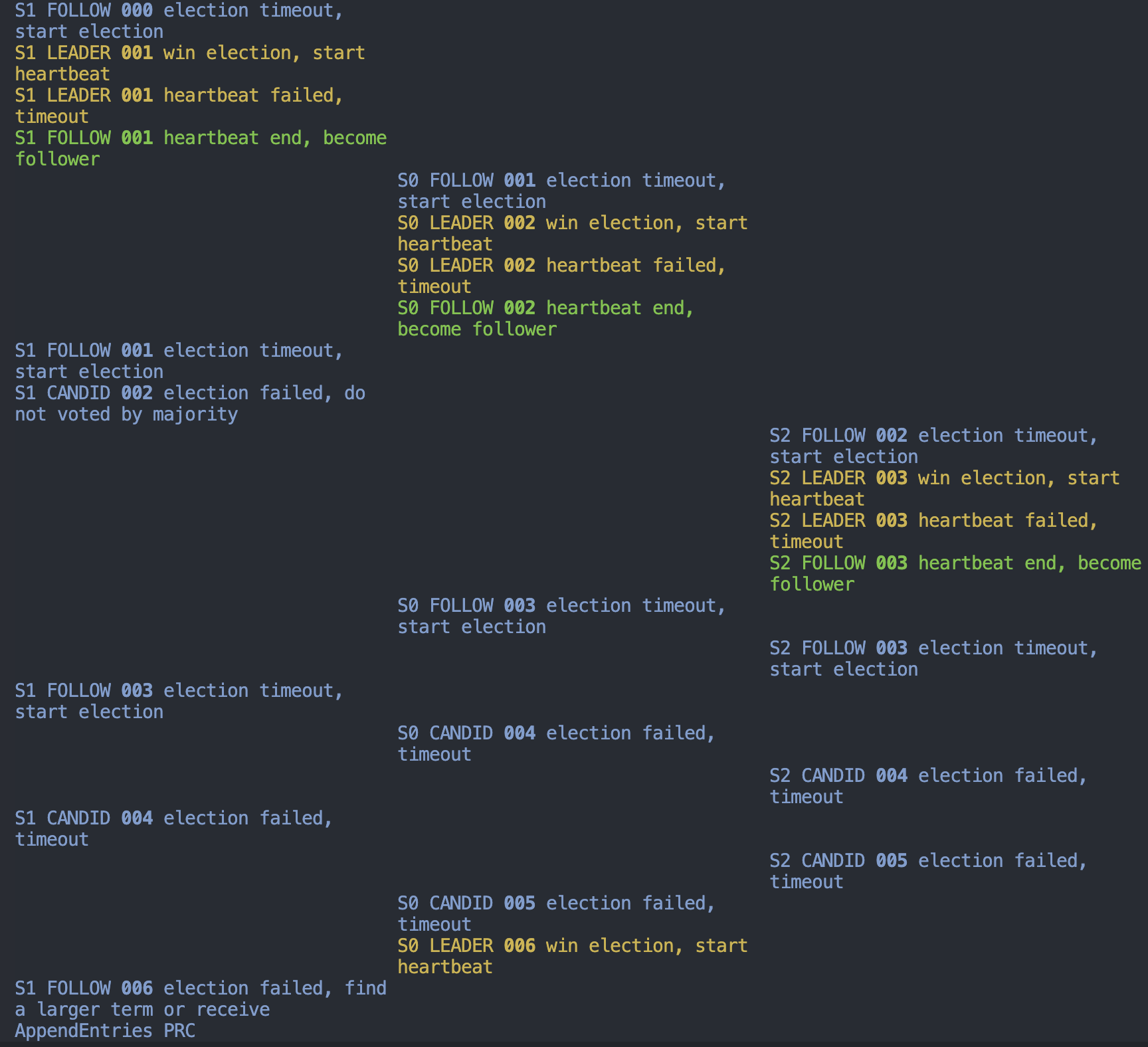
图中包含三个维度的信息,纵轴自上而下代表时间的先后顺序(生产环境上使用需要保证各节点的时间进行同步,本例中都是单机运行无所谓),横轴代表不同的角色(节点),不同的颜色代表不同类型的事件。
Go 日志代码
为了方便 Python 脚本的处理,日志需要用指定的格式生成。我们定义一个单独的包来编写相关代码,方便其他包来调用。
1$ cd src
2$ mkdir dlog
3$ cd dlog
4$ touch dlog.go topic.go
控制日志是否输出
需要能够在运行的时候控制日志是否输出。习惯的做法是使用命令行参数,但是 6.5840 主要用go test命令做测试,不能直接使用命令行参数,所以我们通过环境变量来进行控制。下面的代码读取VERBOSE环境变量来决定是否输出日志。
 1// Retrieve the verbosity level from an environment variable
 2func getVerbosity() int {
 3	v := os.Getenv("VERBOSE")
 4	level := 0
 5	if v != "" {
 6		var err error
 7		level, err = strconv.Atoi(v)
 8		if err != nil {
 9			log.Fatalf("Invalid verbosity %v", v)
10		}
11	}
12	return level
13}
不同主题的日志
这边的主题指的是上面提到的不同类型的事情,不同系统中的主题也各不相同,在单独的文件中进行定义,这边以 lab3A 为例:
 1package dlog
 2
 3type logTopic string
 4
 5const (
 6	Vote      LogTopic = "VOTE"
 7	Election  LogTopic = "ELEC"
 8	Heartbeat LogTopic = "HEAR"
 9	Ticker    LogTopic = "TICK"
10)
日志输出函数
最后一部分是实际执行输出的函数,函数名叫Debug,其他包可以通过dlog.Debug来调用。这个函数会输出从运行开始一直到现在的时间(毫秒)、主题以及具体的日志内容。因为所有的 Lab 基本上几分钟就能运行完,所以不用输出日期、小时这些前缀(因为全都一样),用毫秒输出也方便观察那些固定时间间隔的操作是不是正确。
 1var debugStart time.Time
 2var debugVerbosity int
 3
 4func init() {
 5	debugVerbosity = getVerbosity()
 6	debugStart = time.Now()
 7
 8	log.SetFlags(log.Flags() &^ (log.Ldate | log.Ltime))
 9}
10
11func Debug(topic logTopic, format string, a ...interface{}) {
12	if debugVerbosity >= 1 {
13		time := time.Since(debugStart).Microseconds()
14		time /= 100
15		prefix := fmt.Sprintf("%06d %v ", time, string(topic))
16		format = prefix + format
17		log.Printf(format, a...)
18	}
19}
对于 Raft 这个例子来说,我们可能还希望输出 state、term 等信息,这些信息的读取前需要加锁,因此我们定义一个辅助方法:
1func (rf *Raft) debug(topic dlog.LogTopic, msg string) {
2	rf.mu.Lock()
3	dlog.Debug(topic, "S%d %s %03d "+msg, rf.me, rf.state, rf.currentTerm)
4	rf.mu.Unlock()
5}
在需要加日志的地方(注意不能是临界区)可以这么用:
1rf.debug(dlog.Election, "election failed, receive a larget term")
现在如果在终端输入VERBOSE=1 go test -race -run TestReElection3A,会看到下面的结果:
Test (3A): election after network failure (reliable network)...
008517 ELEC S1 FOLLOW 000 election timeout, start election
008565 HEAR S1 LEADER 001 win election, start heartbeat
015605 HEAR S1 LEADER 001 heartbeat failed, timeout
015610 TICK S1 FOLLOW 001 heartbeat end, become follower
019573 ELEC S0 FOLLOW 001 election timeout, start election
019608 HEAR S0 LEADER 002 win election, start heartbeat
022419 ELEC S1 FOLLOW 001 election timeout, start election
022433 ELEC S1 CANDID 002 election failed, do not voted by majority
024620 HEAR S0 LEADER 002 heartbeat failed, timeout
024621 TICK S0 FOLLOW 002 heartbeat end, become follower
030970 ELEC S2 FOLLOW 002 election timeout, start election
030980 HEAR S2 LEADER 003 win election, start heartbeat
040033 HEAR S2 LEADER 003 heartbeat failed, timeout
040034 TICK S2 FOLLOW 003 heartbeat end, become follower
046916 ELEC S0 FOLLOW 003 election timeout, start election
047283 ELEC S2 FOLLOW 003 election timeout, start election
053894 ELEC S1 FOLLOW 003 election timeout, start election
057390 ELEC S0 CANDID 004 election failed, timeout
057401 HEAR S0 LEADER 005 win election, start heartbeat
057403 ELEC S1 FOLLOW 005 election failed, find a larger term or receive AppendEntries PRC
058890 ELEC S2 CANDID 004 election failed, timeout
062412 HEAR S0 LEADER 005 heartbeat failed, timeout
062412 TICK S0 FOLLOW 005 heartbeat end, become follower
068753 ELEC S2 CANDID 005 election failed, timeout
068758 HEAR S2 LEADER 006 win election, start heartbeat
  ... Passed --  time  7.0s #peers 3 #RPCs    44 #Ops    0
PASS
070777 HEAR S2 LEADER 006 heartbeat failed, do not reach majority
070777 TICK S2 FOLLOW 006 heartbeat end, become follower
ok      6.5840/raft1    8.249s
前五列分别代表事件的发生时间、所属的主题、当前的 server、server 当前的状态、server 当前的 term,剩下的是日志的具体内容。
Python 处理代码
对于终端富文本输出的任务,Go 不太合适,而 Python 因为有 Rich 和 Typer 这样的第三方库,实现起来比较轻松。
人的大脑处理视觉信息的能力很强,给上面的日志加上颜色,按表格排版一下就能达到很好的效果。相关代码如下:
 1#!/usr/bin/env python
 2import sys
 3from typing import Optional
 4
 5import typer
 6from rich import print
 7from rich.columns import Columns
 8from rich.console import Console
 9
10# fmt: off
11# Mapping from topics to colors
12TOPICS = {
13    "ELEC": "#4878bc",
14    "VOTE": "#67a0b2",
15    "HEAR": "#d0b343",
16    "TICK": "#70c43f",
17}
18# fmt: on
19
20
21def list_topics(value: Optional[str]):
22    if value is None:
23        return value
24    topics = value.split(",")
25    for topic in topics:
26        if topic not in TOPICS:
27            raise typer.BadParameter(f"topic {topic} not recognized")
28    return topics
29
30
31def main(
32    file: typer.FileText = typer.Argument(None, help="File to read, stdin otherwise"),
33    colorize: bool = typer.Option(True, "--no-color"),
34    n_columns: Optional[int] = typer.Option(None, "--columns", "-c"),
35    ignore: Optional[str] = typer.Option(None, "--ignore", "-i", callback=list_topics),
36    just: Optional[str] = typer.Option(None, "--just", "-j", callback=list_topics),
37):
38    topics = list(TOPICS)
39
40    # We can take input from a stdin (pipes) or from a file
41    input_ = file if file else sys.stdin
42    # Print just some topics or exclude some topics (good for avoiding verbose ones)
43    if just:
44        topics = just
45    if ignore:
46        topics = [lvl for lvl in topics if lvl not in set(ignore)]
47
48    topics = set(topics)
49    console = Console()
50    width = console.size.width
51
52    panic = False
53    role_pos = {} # arrange different columns for different roles
54    for line in input_:
55        try:
56            time, topic, *msg = line.strip().split(" ")
57            # To ignore some topics
58            if topic not in topics:
59                continue
60
61            if not msg[0] in role_pos:
62                pos = len(role_pos)
63                role_pos[msg[0]] = pos
64
65            msg_content = " ".join(msg)
66
67            # Colorize output by using rich syntax when needed
68            if colorize and topic in TOPICS:
69                color = TOPICS[topic]
70                msg_content = f"[{color}]{msg_content}[/{color}]"
71
72            # Single column printing. Always the case for debug stmts in tests
73            if not n_columns or topic == "TEST":
74                print(time, msg_content)
75            # Multi column printing, timing is dropped to maximize horizontal
76            # space. Heavylifting is done through rich.column.Columns object
77            else:
78                cols = ["" for _ in range(n_columns)]
79                msg_content = "" + msg_content
80                cols[role_pos[msg[0]]] = msg_content
81                col_width = int(width / n_columns)
82                cols = Columns(cols, width=col_width - 1, equal=True, expand=True)
83                print(cols)
84        except:
85            # Code from tests or panics does not follow format
86            # so we print it as is
87            if line.startswith("panic"):
88                panic = True
89            # Output from tests is usually important so add a
90            # horizontal line with hashes to make it more obvious
91            if not panic:
92                print("#" * console.width)
93            print(line, end="")
94
95
96if __name__ == "__main__":
97    typer.run(main)
用法如下所示
1# You can just pipe the go test output into the script
2$ VERBOSE=1 go test -run InitialElection | python ../dlog/log_parser.py
3# ... colored output will be printed
4
5# We can use -c flag to enable multiple columns if we know how many roles included
6$ VERBOSE=1 go test -run ReElection3A | python ../dlog/log_parser.py -c 3
7# ... colored output in 3 columns